See how we helped build real, innovative marketing solutions with Braze
Register for the Braze Innovation Series >
When you're managing marketing campaigns across multiple teams, regions, and channels, staying organized can feel like a full-time job.
Braze is packed with powerful tools, but without a clear system for tagging campaigns, even the most sophisticated marketing orgs end up with cluttered workspaces, duplicated efforts, and reporting headaches.
The fix? A smart, scalable tagging strategy.
At Stitch, we’ve helped global brands turn messy Braze setups into well-oiled machines using nothing more than well-planned tags. In this post, we’ll walk through how to build a tagging system that supports faster workflows, more reliable reporting, and better customer experiences.
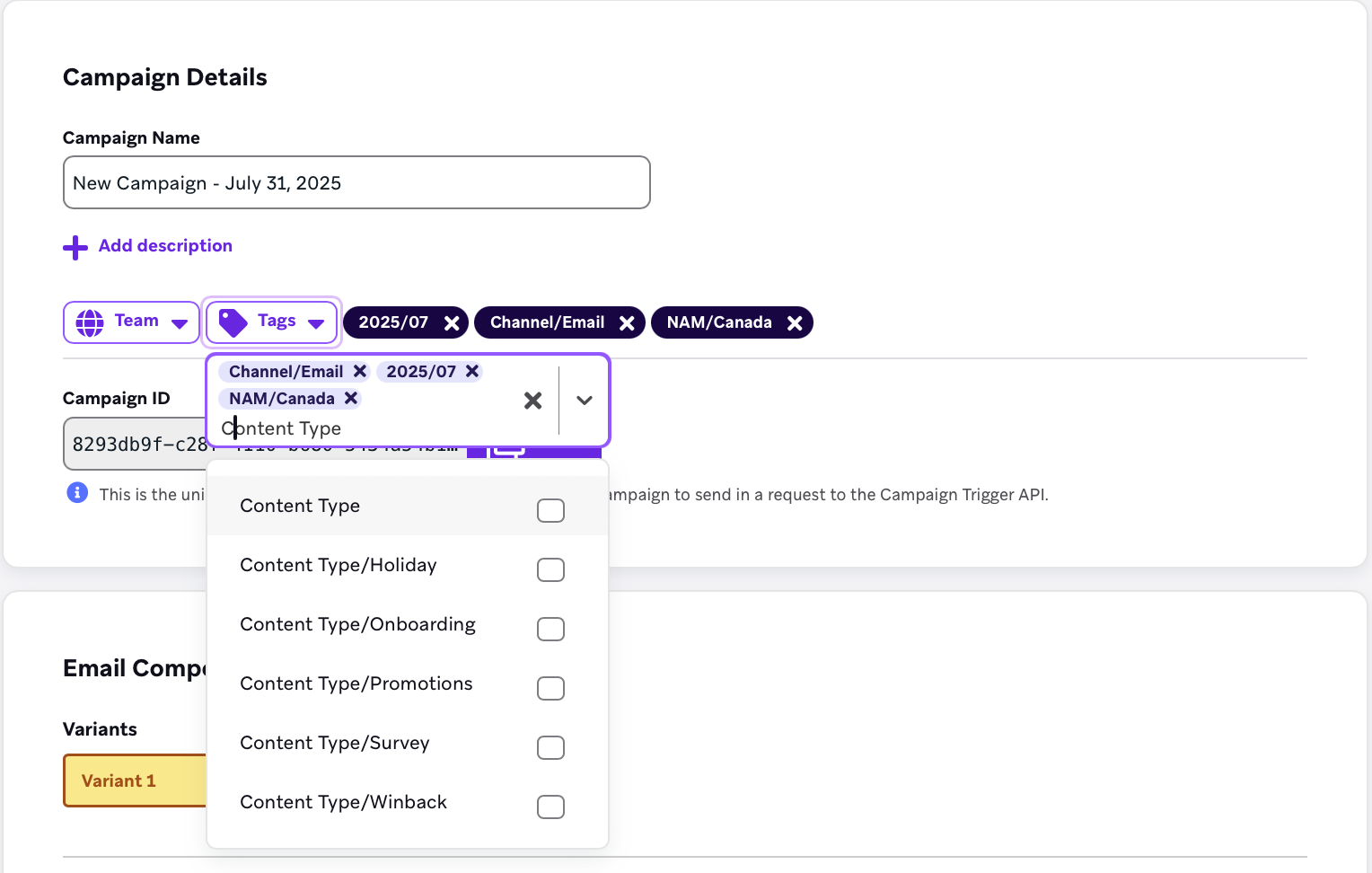
Tags in Braze are simple metadata labels you can apply to campaigns and canvases, but don’t let their simplicity fool you. With up to 250 tags per campaign or canvas, they give you the flexibility to zoom in on specifics or roll up performance across broader themes, depending on your business goals.
When used strategically, tags become one of the most powerful tools in your Braze toolkit. They help you:
Without a strong tagging system in place, things can get messy fast. Inconsistent naming conventions, fragmented reporting, and marketing teams guessing what went out (and when) are all signs it’s time to tighten things up.
Start by asking: What are we trying to solve with tagging?
Common goals include:
Once you’re aligned on objectives, you can build a tagging system that supports these efforts.
The best tagging systems are easy to use and hard to mess up. At Stitch, we recommend a nested structure built around five core dimensions:
This setup gives teams everything they need to work quickly while giving marketing ops and analytics teams the structure they need to scale.
One of the most common pitfalls we see is letting any dashboard user create new tags on the fly. That’s how you end up with “Promotions,” “promotion,” and “PROMO” all floating around your workspace as separate tags.
Avoid that mess by:
Bonus: this also helps ensure your marketers are not using tags that could reveal sensitive user behavior, which matters for teams with strict privacy or legal constraints.
One of our global streaming clients came to us with a tangle of campaigns across dozens of countries and business units. We helped them roll out a tagging system with consistent labels for:
With this in place, they could:
Here’s where it all pays off:
A good tagging system turns your Braze workspace into a high-performing marketing engine. It helps your team move faster, work smarter, and deliver better experiences to your customers.
So ask yourself:
If your team’s ready to clean things up or scale with confidence, we’d love to help. Stitch has helped global brands build tagging systems that support serious growth. Yours could be next.


.jpg)